1Start here
Bloom is a synthesizer plugin. You play it with a MIDI keyboard inside a music program, for example Logic Pro, Ableton Live or REAPER. This manual calls that program the host.
Bloom makes most of its sounds as you play. Its tape keyboard plays real recordings of strings, flute, brass and choirs, like a tape-replay keyboard. Bloom has 126 presets, including 808 basses, tape keyboard sounds, pads, leads and arpeggios. Every preset plays at an even level from the lowest key to the highest key.
Without a license key, Bloom works like Basic Bloom: the play tab and the 50 classic presets. A license key unlocks everything. You buy it once on styley.ca (section 2).
What do you want to do?
- Install BloommacOS or Windows
- Unlock Bloompaste your license key
- Find a sound808s, tape keyboard, pads…
- Play mono, glide or chordsthe play tab
- Use the arpeggiatorfollows the host tempo
- Open Basic Bloom projectsthey open with Bloom
- Get helpemail or Instagram
Quick start
- Install Bloom (section 2). Paste your license key on the about tab (Unlock Bloom).
- Open your host. Make an instrument (MIDI) track. Put Bloom on it (section 3).
- Click the preset name at the top right. Pick a folder and a preset.
- Play your MIDI keyboard, or click the keys at the bottom of the window.
- Change one control at a time and listen. Save your project to keep your changes.
What you need
- A Mac with macOS 11 or later (Apple silicon or Intel), or a Windows 10 or later PC (64-bit).
- A host that can load Audio Unit (AU) or VST3 instruments. On Windows, Bloom can also run as an app on its own.
- A MIDI keyboard. Without one, use the keys on the play tab.
2Install
Save your work and close your host before you install.
macOS
- Download the Bloom installer (.pkg) from styley.ca.
- Double-click the .pkg file.
- Click Continue on each page.
- Keep Audio Unit and VST3 selected. Clear one if your host does not use it.
- Click Install.Bloom goes into the Library folder of your user account. You do not need an administrator password.
- Open your host. If it shows a plugin scan, let it finish.
Windows
- Download the Bloom installer (.exe) from styley.ca.
- Double-click the .exe file.Windows can show "unknown publisher". The installer does not have a Windows signing certificate. Compare the file's SHA256 with the value on styley.ca if you want to make sure it is the correct file.
- Pick VST3 plugin, Standalone application, or both.
- Click Install.
- Open your host. Scan for new plugins.
If you have Basic Bloom
Bloom replaces Basic Bloom. The installer does these things for you:
- It copies your saved Basic Bloom presets to Bloom's preset folder.It does not delete your old presets. It does not overwrite a Bloom preset with the same name.
- It removes the Basic Bloom plugin.The two have the same plugin identity. They cannot be installed together.
After this:
- Projects that used Basic Bloom open with Bloom. They sound the same.
- Basic Bloom's 50 presets are in the folder legacy (basic bloom).
If Basic Bloom was installed for all users (in /Library on a Mac), the installer cannot remove it. Remove Basic Bloom.component and Basic Bloom.vst3 from /Library/Audio/Plug-Ins yourself.
Unlock Bloom
Without a license key, Bloom works like Basic Bloom. You can play the 50 classic presets (the legacy folder) and use the play tab. Bloom's own 76 presets, the advanced tab and the keys, glide, chord, arp and cutoff controls need a key. Your projects always sound the same, with or without a key.
- Buy a license key on styley.ca/bloom, or click buy bloom on Bloom's about tab.The key comes by email from bloom@styley.ca within a few minutes. It starts with BLOOM1-.
- Copy the whole key from the email.
- Open Bloom. Click the about tab.
- Paste the key into the license box. Click unlock.The about tab shows "licensed to" and your name. Every Bloom on this computer is unlocked.
The key works on all your computers. Paste it once on each computer. Bloom checks the key on your computer. It never goes online, and there is no account.
Lost the email? Go to styley.ca/bloom/license. Enter your email and order number. The key shows on the page and comes by email again.
3Open Bloom
Bloom is an instrument. Put it on an instrument track (a MIDI track), not on an audio track. The maker name is styley.
Logic Pro
- Make a Software Instrument track.
- Click the Instrument slot. Choose AU Instruments › styley › Bloom.
Ableton Live
- Open the browser. Click Plug-ins.
- Open VST3 › styley (or Audio Units › styley on a Mac).
- Drag Bloom onto a MIDI track, or onto an empty area to make a new track.
REAPER
- Insert a new track. Click its FX button.
- Type "bloom" in the filter box. Double-click Bloom.
- Arm the track for recording, so your MIDI keyboard plays it.
Without a host (Windows)
The Windows installer can also install Bloom as an app (standalone). Open it from the Start menu. Choose your audio device and your MIDI keyboard in the app's settings.
4The window
 1
2
3
4
5
6
7
8
9
1
2
3
4
5
6
7
8
9
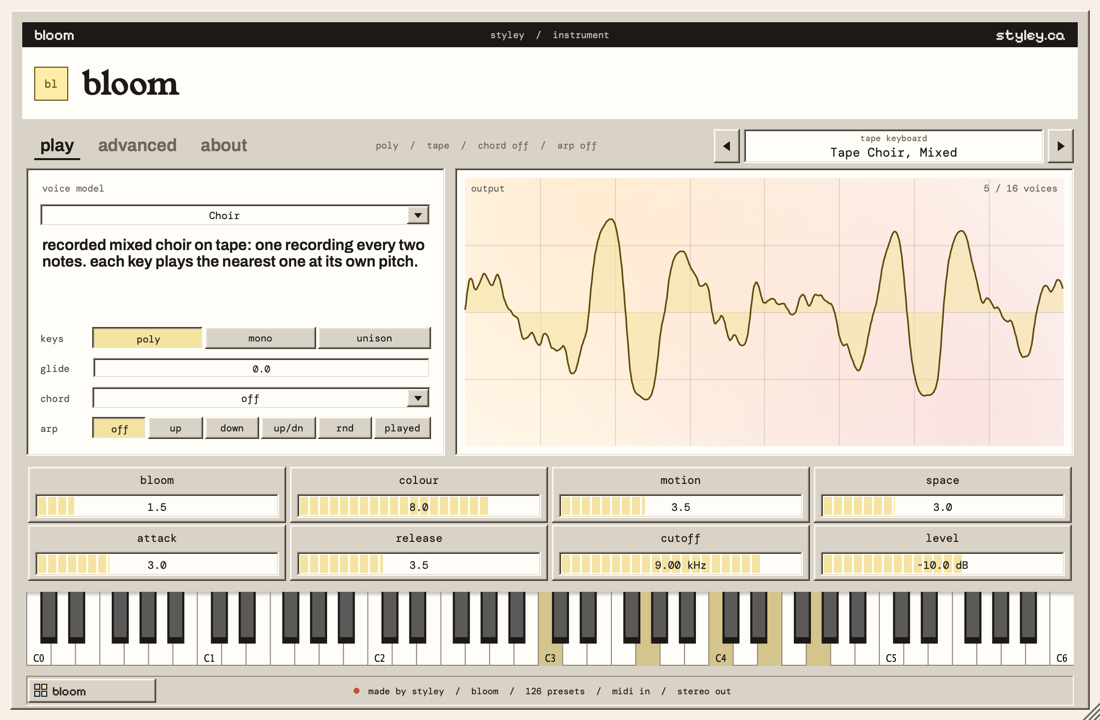
- Tabs. play has the main controls. advanced has every control. about tells you about Bloom, has help and colour settings.
- Summary. The key mode, the number of oscillators in use, the chord and the arpeggiator mode.
- Preset bar. The preset name and its folder. Click the arrows for the previous or next preset. Click the name to see all presets.
- Voice model. One of 19 sound types, with a short description.
- Keys, glide, chord, arp. How the keys play (see section 5).
- Output. A picture of the sound wave and the number of notes that sound now (up to 16).
- Sound controls. Eight main controls.
- Keys. Click them to play from C0 to C6 without a MIDI keyboard.
- Start button. It also opens the preset list.
To change a control: drag left or right on its bar. Hold Shift to drag slowly. Turn the mouse wheel for small steps. Double-click to go back to the start value. Drag the bottom-right corner of the window to resize it.
5The play tab
Keys, glide, chord, arp and cutoff need a license key. Without one, they are grey.
| Control | What it does | Range |
|---|---|---|
| voice model | The sound type that the model part makes. See section 7. | 19 models |
| keys | poly: each key plays its own note. mono: one note at a time; a new note cuts the old note. unison: each key plays four detuned voices. | poly, mono, unison |
| glide | Notes slide in pitch from the previous note. In mono, they slide only when you play legato (hold the old key while you press the new key). 0 is off. | 0 – 10 (up to about 2.5 s) |
| chord | One key plays a chord: octave, fifth, major, minor, sus4, major 7, minor 7, minor 9 or fourths. | off + 9 shapes |
| arp | The arpeggiator plays held notes one at a time: up, down, up/down, random or in the order you played them. | off + 5 modes |
| bloom | Makes the sound richer and warmer, with gentle saturation. | 0 – 10 |
| colour | Makes the sound darker (low) or brighter (high). | 0 – 10 |
| motion | Adds slow movement: drift, detune and width. On tape sounds it adds tape wow and flutter. | 0 – 10 |
| space | Adds a stereo echo. | 0 – 10 |
| attack | How fast each note starts. | 2 ms – 2 s |
| release | How long a note continues after you release the key. | 40 ms – 12 s |
| cutoff | The filter frequency. Lower values make the sound darker. | 20 Hz – 20 kHz |
| level | The output level. | −24 to 0 dB |
6Presets
- Click the preset name at the top right.A list of folders opens.
- Move the pointer to a folder.
- Click a preset.
Without a license key, Bloom's own folders are grey and the arrows go through the legacy presets only.
The arrows beside the name go through all presets in list order. When you change a control, the bar shows modified and a *. The host saves your changes with the project. To keep a sound for other projects, use your host's preset save command.
| Folder | What is in it | Presets |
|---|---|---|
| 808s | 808 basses, ready to play. Mono, in the centre, full level while you hold the key. A new note cuts the old note. Clean, punchy, saturated, distorted, square, saw, octave and drones. | 14 |
| tape keyboard | Real recordings of violins, string section, cello, flute, brass and choirs, played like a tape-replay keyboard. Touch changes the attack and brightness (see section 9). | 12 |
| bass | Mono basses. | 7 |
| leads | Mono leads, many with vibrato and glide. | 8 |
| keys and poly synths | Keys and chord sounds. | 7 |
| plucks, bells and drums | Short and bell-like sounds. | 4 |
| organs | Organ. | 1 |
| brass and strings | Synthesizer brass and strings. | 4 |
| pads | Long, soft sounds. | 6 |
| choirs, breath and drones | Voice-like sounds and drones. | 2 |
| arpeggios and sequences | Presets with the arpeggiator on. Hold a chord. | 8 |
| fx and sweeps | Effects and sweeps. | 3 |
| legacy (basic bloom) | The 50 presets of Basic Bloom, at their old program numbers, for old projects. | 50 |
7How Bloom makes sound
Each note goes through these parts, in this order:
- Sources. The voice model, the tape, four oscillators (VCO 1 to 4) and noise make the raw sound.
- Mixer. Sets how loud each source is.
- Filter. A low-pass filter removes high frequencies. The filter envelope can move it on each note.
- Amp. The amp envelope shapes the level of each note.
- Body. An optional instrument body shapes the tone (for example cello or choir).
- Output. Bloom, colour, space and level.
The 19 voice models
Additive, FM Keys, Pluck, Sync Saws, Reed, E-Piano, Sub Bass, Metal Bell, Choir, Phase Distortion, PWM, Wavefold, Organ, Wind, Tuned Drum, Sine Pad, Saw Pad, Partial Swell, PM Pad. Pick one on the play tab. The text below the list tells you what it is. Set model in the mixer to 0 to use only the oscillators.
8The advanced tab
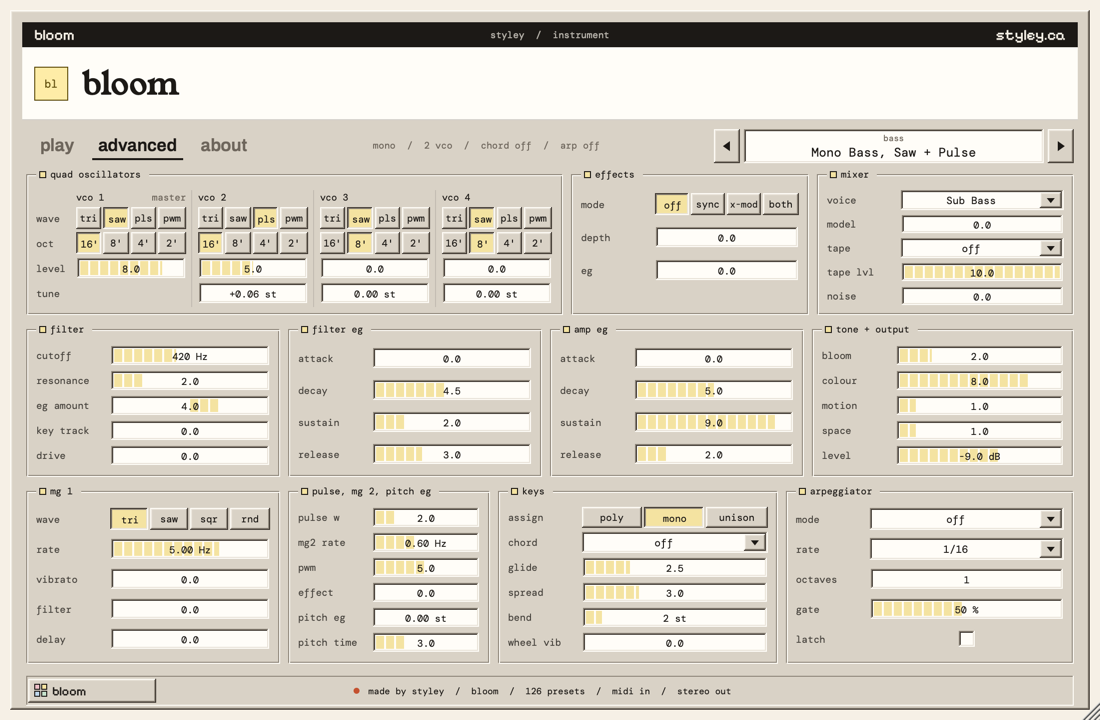
The advanced tab shows every control, in groups. The numbers in the picture match the headings below. It needs a license key (Unlock Bloom).
 1
2
3
4
5
6
7
8
9
10
11
1
2
3
4
5
6
7
8
9
10
11
Oscillators and effects (1, 2)
| Control | What it does | Range |
|---|---|---|
| wave | The wave shape: tri (soft), saw (bright), pls (pulse, hollow), pwm (pulse that moves, with MG 2). | tri, saw, pls, pwm |
| oct | The octave. 16' is one octave down, 8' is normal, 4' and 2' are one and two octaves up. | 16', 8', 4', 2' |
| level | How loud this oscillator is. 0 is off. | 0 – 10 |
| tune (VCO 2–4) | Tunes the oscillator. Small values (0.05 – 0.2) make a thick, detuned sound. 7 is a fifth. | −12 to +12 st |
| mode | VCO 1 is the master. sync restarts VCOs 2–4 with VCO 1 (a hard, vocal sound). x-mod moves their pitch with VCO 1 (metallic sounds). both does both. | off, sync, x-mod, both |
| depth | How much sync or x-mod. | 0 – 10 |
| eg | How much the filter envelope adds to the depth on each note. | 0 – 10 |
Mixer (3)
| Control | What it does | Range |
|---|---|---|
| voice | The voice model (the same as on the play tab). | 19 models |
| model | How loud the voice model is. 0 turns it off, so only the oscillators sound. | 0 – 10 |
| tape | Plays real recordings: violins, cello, strings, flute, brass, bright brass, choir, male choir, female choir or boys choir. There is one recording for every two notes. Each key plays the nearest recording at its own pitch. A held note repeats the steady part of its recording, so it sounds as long as you hold the key. | off + 10 |
| tape lvl | How loud the tape is. | 0 – 10 |
| noise | Adds noise, for breath or air. | 0 – 10 |
The first time you choose a tape, Bloom loads it. This takes less than a second. When your music program exports a song, Bloom waits for the tape, so the export always has it.
Filter, body and touch (4)
| Control | What it does | Range |
|---|---|---|
| cutoff | The filter frequency. Sound above it is removed. The filter never goes below twice the note, so high notes do not go quiet. | 20 Hz – 20 kHz |
| resonance | Makes the sound at the cutoff stronger. High values give a sharp, ringing sound. | 0 – 10 |
| eg amount | How far the filter envelope moves the cutoff on each note. Negative values move it down. | −10 to +10 (±7 octaves) |
| key track | The cutoff follows the note. At 10, it moves one octave for each octave you play. | 0 – 10 |
| drive | Pushes the sound into the filter for saturation. | 0 – 10 |
| body | An instrument body: violins, cello, strings, flute, brass, bright brass, choir, male choir, female choir, boys choir. It changes the tone, not the level. | off + 10 |
| body amount | How strong the body is. | 0 – 10 |
| touch attack | Soft notes start more slowly. | 0 – 10 |
| touch brightness | Soft notes are darker. | 0 – 10 (up to 3 octaves) |
Envelopes and tone (5, 6, 7)
An envelope changes a value during each note: attack (how fast it rises), decay (how fast it falls to sustain), sustain (the level while you hold the key) and release (how fast it falls after you release the key).
| Control | What it does | Range |
|---|---|---|
| filter eg | Attack, decay, sustain and release for the filter cutoff. | attack 1 ms – 3 s, decay and release 5 ms – 10 s |
| amp eg | Attack, decay, sustain and release for the level. At sustain 10, a note stays at full level while you hold the key. | attack 2 ms – 2 s, decay 20 ms – 10 s, release 40 ms – 12 s |
| tone + output | Bloom, colour, motion, space and level (the same as on the play tab). | see section 5 |
Pulse width and modulation (8, 9)
MG means modulation generator: a slow wave that moves another control.
| Control | What it does | Range |
|---|---|---|
| mg 1 wave | The shape of MG 1: triangle, saw, square or random. | tri, saw, sqr, rnd |
| mg 1 rate | How fast MG 1 moves. | 0.05 – 20 Hz |
| vibrato | How much MG 1 moves the pitch. | 0 – 10 (up to 1 semitone) |
| filter | How much MG 1 moves the cutoff. | 0 – 10 (up to ±2 octaves) |
| delay | MG 1 fades in after the note starts. | 0 – 4 s |
| pulse w | The width of the pulse wave. 0 is square. Higher values are thinner. | 0 – 10 |
| mg2 rate | How fast MG 2 moves. | 0.05 – 20 Hz |
| pwm | How much MG 2 moves the width of pwm waves. | 0 – 10 |
| effect | How much MG 2 moves the sync or x-mod depth. | 0 – 10 |
| pitch eg | Each note starts at a different pitch and falls (or rises) to the played note. Use it for 808 punch and zaps. | −24 to +24 st |
| pitch time | How fast the pitch reaches the played note. | 5 ms – 2 s |
Keys (10)
| Control | What it does | Range |
|---|---|---|
| assign | poly, mono or unison (see section 5). Mono notes play in the centre. | poly, mono, unison |
| chord | The chord that one key plays. | off + 9 shapes |
| glide | How long a note takes to slide to the next pitch. | 0 – 10 |
| spread | Unison only: how detuned and how wide the four voices are. | 0 – 10 |
| bend | How far the pitch bend wheel moves the pitch. | 1 – 12 st |
| wheel vib | How much vibrato the mod wheel adds. 0 is off. | 0 – 10 |
Arpeggiator (11)
| Control | What it does | Range |
|---|---|---|
| mode | The order of the notes: up, down, up/down, random or as played. Off stops it. | off + 5 modes |
| rate | The note length, from the host tempo. | 1/4, 1/8, 1/8 t, 1/16, 1/16 t, 1/32 |
| octaves | How many octaves the pattern goes up. | 1 – 4 |
| gate | How long each note sounds, as a part of one step. Low values are short and staccato. | 5 – 100 % |
| latch | On: the pattern continues after you release the keys. Turn it off to stop the pattern. | on, off |
When the host plays, the arpeggiator follows the host's beat grid. When the host is stopped, it uses the host tempo.
9How to
Play an 808 with slides
- Open the 808s folder. Pick a preset.
- On the play tab, set glide to 2 – 4.
- Hold a note. Press the next note before you release the first one.The pitch slides to the new note. Notes that do not overlap do not slide.
808 presets hold their level while you hold the key. Each 808 stays within 0.3 dB from C0 to C4, so low notes do not get quiet.
Play the tape keyboard sounds
- Open the tape keyboard folder. Pick a preset, for example Tape Cello.
- Play softly, then play hard.Soft notes start more slowly and sound darker, like a key that presses the tape lightly against the head. Hard notes start fast and bright.
- For more tape wow and flutter, raise motion.
- To change the instrument, open the advanced tab and choose a tape in the mixer.
Violins, string section, cello, flute, brass and the choirs are real recordings. There is one recording for every two notes, and each key plays the nearest one at its own pitch. Above the highest recording and below the lowest, the nearest recording is played faster or slower. The choirs were sung for Bloom and recorded on cassette, so they have real tape hiss and wow.
Cello, string section, both brass sounds and the male choir sound one octave below the key, like the original tapes.
Make a sound from the start
- Pick a simple preset, for example Mono Bass, Saw + Pulse.
- Click advanced. Set the oscillator levels and waves.
- Set cutoff and resonance. Then set eg amount and the filter eg.
- Set the amp eg.
- Add vibrato (mg 1) or space if you want it.
Use the arpeggiator
- On the play tab, click an arp mode, for example up.
- Hold a chord.The notes play one at a time, in time with the host tempo.
- On the advanced tab, set rate, octaves and gate.
Play chords with one finger
- On the play tab, click the chord box.
- Pick a shape, for example minor 7.
- Play one key.You hear the whole chord.
10Colours
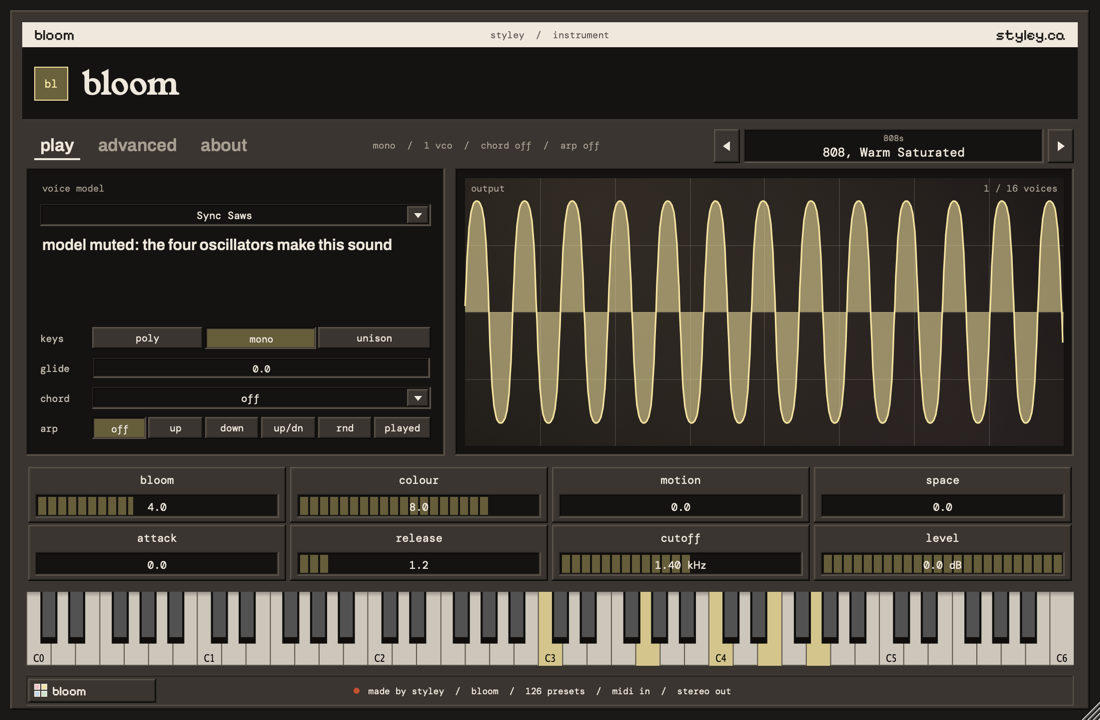
- Click the about tab.
- Under COLOURS, click light, grey, dark or black.The window changes at once.
Your choice applies to every styley plugin, in every project, until you change it.
11If something is wrong
| Problem | Do this |
|---|---|
| I cannot find Bloom | Close and open the host again. Start a plugin scan. Make sure you installed the format your host uses (AU or VST3). The maker name is styley. |
| No sound | Put Bloom on an instrument (MIDI) track. Select or arm the track. Click the keys in the window: if they make sound, check your MIDI keyboard and the track input. Check that level is not at −24 dB. |
| Only one note plays at a time | The keys mode is mono. Click poly. |
| Notes slide in pitch | Set glide to 0. |
| One key plays many notes | Set chord to off and arp to off. |
| Notes do not stop | The arpeggiator latch is on, or the sustain pedal is down. Turn off latch on the advanced tab. |
| The sound is too loud or distorted | Lower level. Lower drive and bloom. |
| Bloom says "unlicensed" | Bloom works like Basic Bloom until you enter a key. Paste your key on the about tab (Unlock Bloom). |
| My key is not accepted | Copy the whole key, from BLOOM1- to the end. Line breaks in the email do not matter. If it still does not work, forward the email to styley@styley.ca. |
| I lost my key | Go to styley.ca/bloom/license. Enter your email and order number. |
| Basic Bloom is gone | This is correct. Bloom replaces it. Your old projects open with Bloom. The old presets are in legacy (basic bloom). |
| Something else | Click about, then copy issue report. Paste it into an email to styley@styley.ca and tell me what happened. |
12Words in this manual
- host
- The music program that runs the plugin, for example Logic Pro, Ableton Live or REAPER.
- MIDI
- The note data that a keyboard sends to a synthesizer.
- velocity
- How hard you play a key. Harder notes are louder (and, with touch, faster and brighter).
- oscillator (VCO)
- A part that makes a simple wave at the note's pitch.
- filter
- A part that removes some frequencies. Bloom's filter removes high frequencies.
- envelope (EG)
- A shape that changes a value during each note: attack, decay, sustain, release.
- modulation (MG)
- A slow wave that moves another control, for example pitch for vibrato.
- glide
- A slide in pitch from one note to the next.
- license key
- A long text that starts with BLOOM1-. It unlocks Bloom. You get it by email after you buy Bloom.
- legato
- Play the next key before you release the last one.
- arpeggiator
- A part that plays held notes one after the other, in time.
- st (semitone)
- The step from one key to the next key. 12 semitones make one octave.
- dB, Hz
- dB is a unit of level. Hz is a unit of frequency (20 Hz is very low, 20 kHz is very high).
- 16', 8', 4', 2'
- Octave names from organs. 8' is the normal pitch. Each step halves or doubles it.
13Help and price
Need help? Write to me.
- Email: styley@styley.ca
- Instagram: send a message to @styley.ca
Tell me your host, your system and what happened. The about tab has a copy issue report button. It copies the details I need.
Why Bloom
I made Bloom for a couple of reasons. Some synths are good at a few things but bad at others (keys vs. 808s, for example), and most synths behave poorly at low or high octaves.
Also, most synths are super complicated to use, especially today, when most producers don't own analog synthesizers. They also usually look bad, and I like customization, so I did my best to address these issues.
Price
Bloom costs $4.99 or more, paid once. You choose the price. Your license key comes by email. It works on all your computers, there is no account, and Bloom never goes online. Every 2.x update is free. Thank you for buying Bloom.
Basic Suite, with Basic Bloom, stays free.
Made by styley (Liam Patterson), Cobourg, Ontario. The quad oscillator engine takes its layout from classic four-oscillator mono/poly synthesizers. The tape keyboard's strings, flute and brass are recordings from VSCO 2 Community Edition by Versilian Studios (CC0 1.0, public domain). The choirs were recorded by styley on a cassette four-track. Their octaves follow measurements of tape-replay recordings. Fonts: Young Serif, Archivo, DM Mono and Pixelify Sans (SIL Open Font License). VST is a registered trademark of Steinberg Media Technologies GmbH. Audio Units and Logic Pro are trademarks of Apple Inc.